

At a glance
P999 Game overview
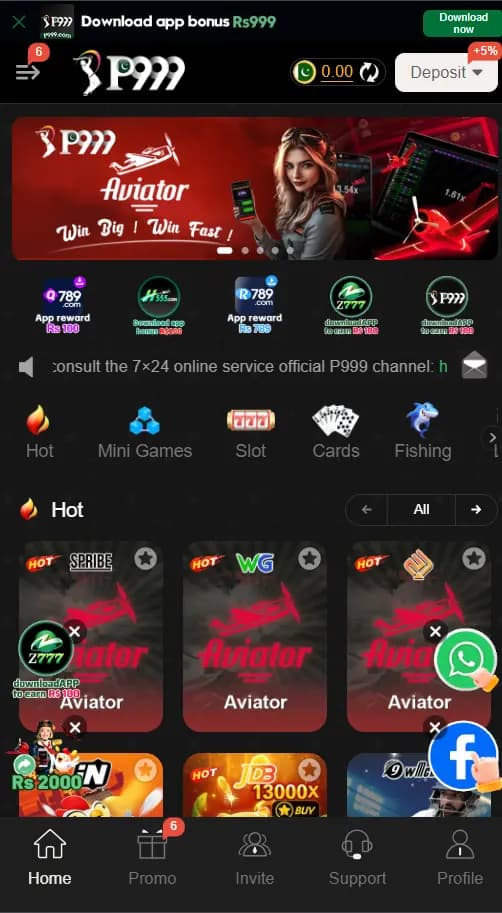
The current P999 interface places the account balance and deposit control in the top bar, category navigation in the main area, and Home, Promo, Invite, Support, and Profile shortcuts along the bottom. New users can register with a Pakistani phone number or email and choose password registration or code registration. Returning users can use a password or verification code, remember the account on a private device, recover a forgotten password, or open customer service from the same screen. The available Android package details can change, so the linked page remains the best place to confirm the current file before downloading.
What You See Inside the P999 App
The P999 home screen is arranged for one-handed mobile use. The upper bar shows the P999 identity, account balance, and a deposit menu. Below it is a large promotional banner followed by category shortcuts and a grid of available games. A fixed navigation row keeps Home, Promo, Invite, Support, and Profile within reach, which makes it easy to move from the game list to account or help tools without searching through several menus.
The home-screen image also shows Mini Games, Cards, Fishing, and other category tabs. Individual titles and promotions can rotate over time, so the current app may not match every tile visible in the screenshot. The important layout remains consistent: browse from Home, check promotional information under Promo, manage invitations through Invite, contact the platform through Support, and review account details under Profile.
Related resources: Browse recently added Android games
P999 Game APK Download Options
Open the P999 destination using the button on this page and look for the Android download control. At the time of this review, the destination data lists a lightweight Android package identified as version 1.1.62 at approximately 6.7 MB and a larger package identified as version 6.9.18 at approximately 76.77 MB. These values come from the current linked page and may be replaced by later builds, so compare the version and file size shown when you visit.
The smaller package may be useful when storage space or connection speed is limited, while the larger package may contain more of the app resources in the initial download. After choosing a package, allow the file to finish before opening it. If Android blocks the installer, open the permission screen for the browser or file manager you used, allow installation from that source, return to the downloaded file, and tap Install. Turn that permission off again when installation is complete.
Related resources: Latest Android APK guides · Android installation settings help
P999 Game Registration: Phone or Email
The P999 Game registration screen accepts a Pakistani phone number or an email address and offers both password and verification-code methods. Start by selecting Register at the top of the account screen, then choose the method that matches how you want to access the account later.
Password registration
Enter the phone number or email, create a password, enter it again, and check the age and user-agreement confirmation before pressing Register. Use a password that is different from passwords used for email, banking, or social accounts.
Verification-code registration
Code registration uses a verification code instead of relying only on a password. Keep the selected phone number active long enough to receive the code and enter it only inside the P999 form. The screen also displays Google, Facebook, and Telegram account-binding choices. Those options are not required for every user; choose only the account method you are comfortable linking and review any permission request before accepting it.
Related resources: Compare the 666P registration and login guide
P999 Game Login and Password Recovery
For P999 Game login, switch from Register to Login at the top of the account screen and enter the same phone number or email used during registration. The page provides separate controls for password access, code access, account recovery, and customer service.
Password Login
Password Login is convenient for regular access. The Remember account password option should be used only on a private phone that other people cannot access.
Code login and account recovery
Code login can help when a verification message is available. If the saved password no longer works, use Forgot Password rather than repeatedly guessing. Confirm that the phone number includes the correct Pakistan country code when required, check the email address for typing errors, and request a fresh code if an older one has expired. The screen also provides Customer Service and Demo shortcuts.
Home, Promotions, Support and Profile
After login, Home is the main discovery area. Promo collects current campaigns and app events, while Invite contains the account-sharing and invitation tools shown by P999. Promotional amounts and eligibility rules can change, so open the full details inside the app before acting on a banner. Screenshots are useful for recognizing the controls, but they should not be treated as a permanent list of current offers.
Support opens the available help channel for account, download, or transaction questions. Profile is where users should expect to find personal details, security settings, and account records. Before changing a phone number or email, make sure the replacement contact method is available for verification. Avoid sending passwords or one-time codes through chat, social media, or messages outside the account screen.
Using the P999 Balance and Payment Area
The home screenshot shows the account balance beside a Deposit control, indicating that payment tools are managed from the signed-in interface. Available methods, minimum amounts, processing rules, and account-name requirements should be checked in the live payment screen because they can vary by account and date.
Open the relevant payment menu, read the amount and account details shown on screen, and confirm that the phone or wallet information is correct before submitting anything. Keep the transaction reference until the balance updates. For withdrawal-related questions, use the current Support area and rely on the instructions displayed for your account rather than screenshots or figures copied from an older page.
Related resources: Games with JazzCash options · Games with Easypaisa options
Common Download and Login Fixes
If the APK download pauses, check available storage, switch to a stable connection, and restart the download from the linked P999 page. When Android reports that the package cannot be opened, remove the incomplete file and download it again. An older installed build can also conflict with a newer package; preserve any account details you need before replacing or reinstalling the app.
For login problems, first verify the selected country code, phone number, email spelling, and login method. Request only one fresh verification code at a time and wait for it to arrive. If the home screen loads without account information, close and reopen the app after checking the connection. Use the in-app Support shortcut when the problem involves an account record rather than the Android installation itself.
Related resources: How to compare Android APK games
Bottom line
What to know before opening P999 Game
P999 is easiest to understand as a mobile gaming hub with straightforward account screens and direct access to promotions, support, and profile controls. Its strongest search intent is practical: download the Android app, register correctly, and know where to log in again.
P999 Game highlights
- Separate lightweight and full Android package options on the linked page
- Phone number or email registration
- Password and verification-code account access
- Home, Promo, Invite, Support, and Profile navigation
- Customer service and forgotten-password controls
- English and Urdu listed among the available languages
P999 Game FAQs
Where can I download the P999 Game APK?
Use the Get P999 for Android button on this page to open the saved P999 destination and select its current Android package.
What P999 Android versions are currently listed?
The linked page currently lists lightweight version 1.1.62 and larger version 6.9.18, but confirm both values before downloading.
Can I register for P999 with an email address?
The approved registration screenshot shows a phone number or email field, together with password registration and verification-code registration choices.
How do I log in to P999 Game?
Open Login, enter the registered phone number or email, and select either Password Login or Code login on the account screen.
What should I do if I forget my P999 password?
Choose Forgot Password on the login screen, complete the displayed recovery steps, or open Customer Service if account recovery remains unavailable.
Does P999 offer a smaller APK package?
The destination currently lists an approximately 6.7 MB lightweight package alongside a larger package, although future file sizes may change.