

At a glance
K888 Game overview
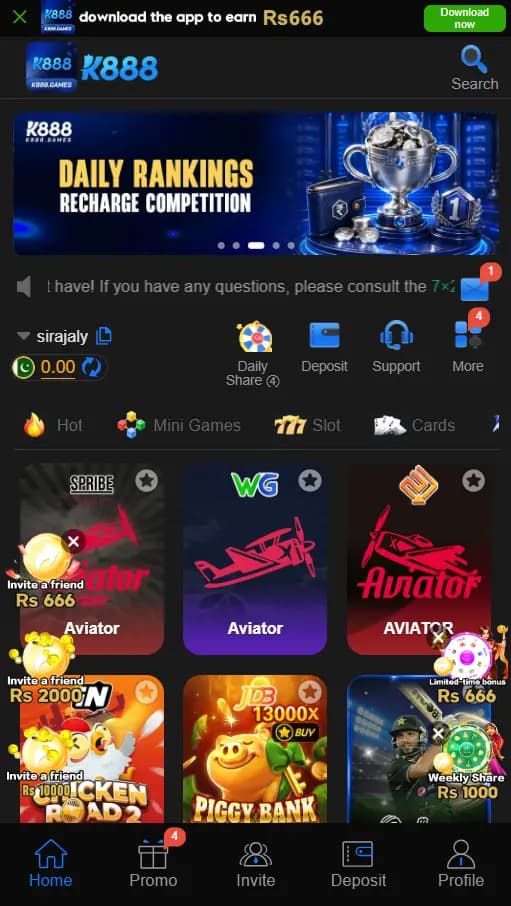
The K888 home screen places search and promotional content near the top, followed by account shortcuts and a grid of available titles. Daily Share, Deposit, Support, and More appear above the category area, while the bottom navigation keeps the primary account sections available throughout the app. Registration is designed around a Pakistan phone number and offers password or verification-code setup. A separate promotions screen groups current activity under Event, Mission, VIP, Unclaimed, and History tabs, making K888 especially useful for users who want the download, account, and promotion controls explained together.
What the K888 Mobile Screens Show
The K888 home screen uses a compact layout intended for portrait phones. A search control sits in the upper area, followed by a large rotating banner and a short announcement row. The signed-in account name and balance appear above four quick controls: Daily Share, Deposit, Support, and More. This arrangement keeps common actions close to the top without hiding the main catalogue.
Below those controls, the app presents category tabs and a three-column grid of game tiles. Home, Promo, Invite, Deposit, and Profile stay in the bottom navigation. The visible screen therefore gives new users a clear route: use Home to browse, Promo to review current events, Invite for sharing tools, Deposit for the account balance area, and Profile for personal account controls.
Related resources: Browse the latest Android game guides
K888 APK Download and Android Installation
Use the K888 button on this page to open the current mobile destination. Its landing screen shows two choices near the bottom: Play now for browser access and Download APP for the Android package. Select Download APP when you want the installable file, then allow the download to finish before opening it from your browser downloads or Android file manager.
K888 package details can change as the app is updated, so compare the version, file size, and Android requirements shown on the current destination instead of relying on an old number. A complete download should appear as an APK file. If the file name, brand, or requested permissions look unrelated to K888, stop before installation.
Before starting the download
Check that the destination displays the blue K888 identity shown in this page's screenshots. Make sure the phone has enough free storage and use a stable connection so the package is not interrupted. Keeping the browser open until the download finishes can make the file easier to locate.
Install the completed APK
Open the completed file and follow Android's installation prompt. If Android asks for permission to install from the browser or file manager, allow it only for the source you are using, return to the file, and complete the installation. The permission can be disabled again after K888 has been installed.
Related resources: Compare current Android APK download guides · Android installation settings help
K888 Game Registration with a Pakistan Number
The K888 Game registration screen is set to Pakistan with the +92 country code and states that only phone-number registration is supported. Open the app, choose Register, and enter an active mobile number that you can continue using for account access. The form provides Password registration and Code register as separate methods.
Before pressing Register, review the user-agreement confirmation shown above the button. The screen also provides Customer Service and a Google binding option beneath the main form. Account binding is separate from phone registration, so read any permission request before connecting another account.
Create an account with a password
Keep Password registration selected, enter the phone number, and create a password that is not used for email, banking, or social accounts. The strength indicator helps show whether the password needs improvement. Check the displayed agreement box only after reviewing it, then use the blue Register button.
Use verification-code registration
Choose Code register when you prefer the verification method displayed by K888. Keep the registered SIM active, request the code inside the form, and enter it only on the K888 account screen. Wait for the current code instead of requesting several messages in quick succession.
Related resources: Compare the P999 registration and login guide
K888 Game Login and Returning Account Access
Existing users can select Login at the top of the same K888 account panel. Use the phone number and account method chosen during registration, then complete the fields displayed by the current app. Keeping the same +92 number format used during signup can prevent a simple mismatch at login.
If the account does not open, first check the number, password, verification-code method, and internet connection. Avoid creating a second account merely because the first attempt fails. The Customer Service shortcut visible on the account screen is the appropriate place to ask about an account-specific problem.
Check the selected access method
A password account should be opened through the password option, while an account created with code verification may require the code route shown in the app. Enter details carefully and request a fresh code only when the previous one has expired.
Find account assistance
Use Customer Service from the registration or login panel when the phone number is no longer available or the account details cannot be recovered through the visible controls. Describe the account issue without sending a password or verification code in a message.
Related resources: Read the 666P download and account guide
Using Home, Search and the Bottom Navigation
Home is the main browsing area after account access. Use Search when you already know which title you want, or move through the visible category tabs and tile grid. The Daily Share shortcut sits beside Deposit, Support, and More, so these actions do not require opening Profile first.
The bottom row is useful when moving between tasks. Promo opens the event centre, Invite opens the app's sharing area, Deposit returns to the balance controls, and Profile contains personal account information. Small notification badges may appear beside sections with new items, allowing users to see where an update is waiting.
K888 Promotions, Events and Reward Panels
The K888 promotions screenshot separates activity into Event, Mission, VIP, Unclaimed, and History tabs. A second filter column includes All, New, Cooperate, and Player activity. This structure lets users review current banners, tasks, account-level items, unclaimed entries, and earlier activity without mixing everything into the Home screen.
Visible banners include invite, daily-share, monthly mission, and deposit-related promotions with rupee amounts. Treat those figures as examples from the captured screen because event values and eligibility can change. Open the individual promotion inside K888 and read its current dates, qualifying actions, and account rules before using it.
Deposit Area and Local Wallet Checks
K888 places Deposit in both the quick-control row and the bottom navigation, making the balance area easy to reach. Open that screen only after login and verify the account name, amount, and payment instructions shown for the current session. Keep the transaction reference until the in-app balance reflects the completed action.
If JazzCash or Easypaisa appears in the signed-in K888 Deposit screen, confirm the account details before continuing. The screenshots on this page show the Deposit controls but do not identify a particular wallet, minimum amount, processing time, or fee. Use only the payment method and details displayed for the account you are accessing.
Related resources: Browse Android games with JazzCash information · Browse Android games with Easypaisa information
Common K888 Download and Account Fixes
When the K888 APK download stops early, check storage space and connection quality, remove the incomplete file, and start again from the K888 page linked here. If Android cannot open the package, confirm that the download completed and that the file is an APK. An older installation can also conflict with a newer package, so preserve the account number before replacing the app.
For registration or login problems, confirm the Pakistan country code, recheck every digit of the phone number, and make sure the correct password or code method is selected. Close and reopen the app after checking the connection if the home screen does not load. Account-specific balance, promotion, or access questions should be handled through the Support or Customer Service control visible in K888.
Related resources: How to compare Android APK game pages
Bottom line
What to know before opening K888 Game
K888 combines its Android access page, phone registration, home navigation, and promotion centre in a straightforward mobile flow. The screenshots make the account controls easy to identify before opening the current destination.
K888 Game highlights
- Play now and Download APP choices on the current K888 destination
- Pakistan phone-number registration
- Password and verification-code registration methods
- Home, Promo, Invite, Deposit, and Profile navigation
- Daily Share, Support, search, and account shortcuts
- Event, Mission, VIP, Unclaimed, and History promotion tabs
K888 Game FAQs
Where can I open the K888 APK download page?
Use the Open K888 Android Download button on this page to reach the current K888 destination, then choose its Download APP option.
Does K888 offer browser and Android access?
The current K888 landing screen displays both Play now and Download APP buttons, allowing users to choose the route offered for their device.
How do I register for K888 Game?
Open Register, enter an active Pakistan phone number, choose password or verification-code registration, review the agreement, and submit the displayed form.
How do I return to my K888 account?
Select Login at the top of the account panel and use the same phone number and access method selected when the account was created.
What sections appear in the K888 app?
The approved screens show Home, Promo, Invite, Deposit, Profile, Daily Share, Support, search, and a promotion centre with several activity tabs.
Does K888 show JazzCash or Easypaisa?
The reviewed screenshots show Deposit controls but not a named wallet, so check the current signed-in payment screen for the methods available to your account.